Introduction: What Is Testing in Software Beyond a Definition
Why this topic still confuses teams
If you ask ten people what is testing in software, you’ll often get ten answers, and that’s not because people are careless. It’s because testing sits at the intersection of engineering, product, and business risk.
A big source of confusion is the historical overlap between testing and debugging. Debugging is fixing. Testing is investigating. When teams blend these, testing becomes “something you do after code is written,” instead of a continuous way to learn whether the product is actually safe and valuable.
There’s also the problem of ambiguity. Requirements rarely have one meaning. Even a simple statement like “users should be able to reset passwords quickly” can hide dozens of interpretations:
- Quickly for whom?
- How secure is “secure enough”?
- What happens if the email provider delays delivery?
- What about locked accounts, fraud attempts, or accessibility needs?
This is where teams often struggle to separate:
- Verification: Are we building the product right?
- Validation: Are we building the right product?
When that clarity is missing, testing becomes a “buffer phase” to make up for delays—and quality gets squeezed.
A modern definition of software testing
So, what is testing in software in modern teams?
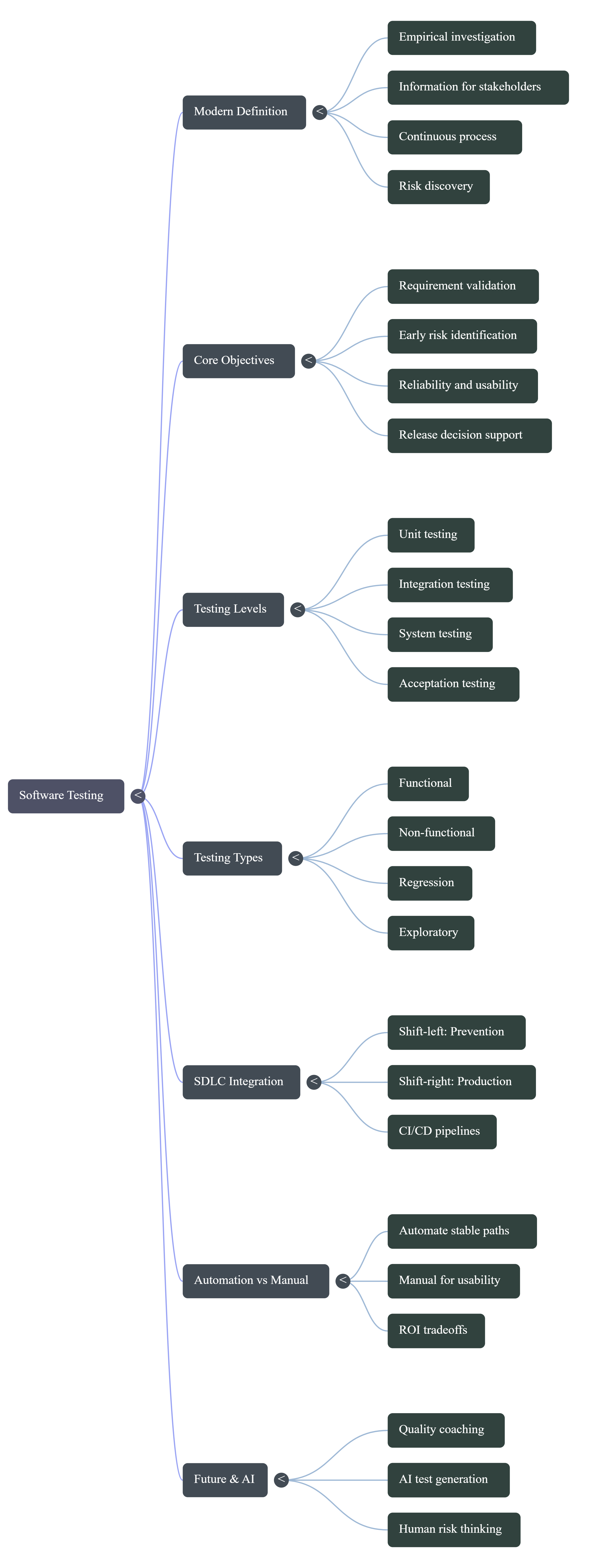
Software testing is an empirical, technical investigation designed to provide stakeholders with objective information about quality and risk. It’s not a one-time phase, and it’s not just “bug hunting.” It’s a continuous process of comparing what we expect the system to do (requirements, user goals, models) with what the system actually does when we interact with it.
Modern testing is evidence-driven. It’s about uncovering what’s true, what’s uncertain, and what could hurt users or the business if it fails.
What this article will cover
This article explains what software testing is as a strategy for quality assurance and risk management. You’ll learn:
- Why bug finding alone is too narrow
- The core objectives of testing
- How testing supports release decisions
- Where testing fits in SDLC and DevOps
- Key testing types and levels
- Manual vs automation tradeoffs
- Exploratory testing, shift-left/shift-right
- How AI helps without replacing testers
- Metrics that matter beyond pass/fail
- A detailed FAQ using the exact questions you listed
What Is Testing in Software and Why Bug Finding Is Too Narrow

The common bug-finding misconception
A classic misunderstanding is:
A successful test is one that finds a bug.
That mindset sounds logical until you think about it. If your product is stable, does that mean testing was useless? Of course not.
Sometimes the most valuable outcome is confirmation:
- Checkout still works after a pricing refactor
- Login is stable across browsers
- Permissions haven’t regressed
- The system fails gracefully when something external breaks
Testing isn’t about “creating problems.” It’s about revealing reality—good or bad.
Testing as validation and learning
Testing is also a learning loop. Every interaction teaches the team something:
- How users might actually behave
- Where edge cases live
- What assumptions don’t hold up
- Which flows are fragile under change
Great testers don’t just run steps. They ask:
- “What could go wrong here?”
- “What would that cost us?”
- “What would a real user do, not what we expect them to do?”
That’s why testing isn’t a mechanical task—it’s a thinking task.
Why defect-free software is not a practical goal
Testing can detect defects, but it can’t prove their absence. Real systems have too many combinations of devices, browsers, networks, data states, user roles, integrations, and timing behaviors.
So the goal isn’t “perfect.” It’s risk reduction with clarity:
- Test what matters most
- Surface the remaining risk
- Help leaders make informed release calls
If you want a clear breakdown of why “complete testing” is unrealistic, see our article on software testing limitations.
Core Objectives of Software Testing
Validate requirements and expected behavior
The most direct objective: confirm the software does what it’s supposed to do. Good teams reduce ambiguity by connecting:
- Requirement → test scenario → evidence → result
This prevents “we assumed it was covered” from becoming “users say it doesn’t work.”
Identify risks early
Testing is an early warning system. The earlier you discover a requirement gap or design flaw, the cheaper it is to fix. That’s the practical meaning of shift-left: economics, not ideology.
Improve reliability, usability, and confidence
Testing improves more than correctness. It influences reliability, usability, performance, security, and accessibility. When these aren’t tested, teams don’t “save time”—they borrow time from the future with interest.
Read our article on aligning your test strategy with your software testing objectives.
Testing as Risk Discovery and Decision Support
Testing as information gathering
Testing produces information stakeholders can act on:
- What works
- What doesn’t
- What’s unclear
- What is risky
- What is still unknown
That last point—unknowns—is where outages and failed releases usually come from.
Business risk vs technical risk
Not every defect is equal.
- Technical risk: memory leak, race condition, API timeout
- Business risk: checkout failures, incorrect billing, data exposure, compliance issues
A small technical issue can become a major business failure if it hits payments, identity, or trust.
How testing supports release decisions
Release decisions shouldn’t rely on gut feel. Testing supports decisions with evidence:
- Are critical flows covered?
- Are open issues acceptable?
- What’s the impact if a known risk hits production?
- Do we have mitigations (feature flags, rollback, monitoring)?
Where Testing Fits in the SDLC and DevOps Lifecycle
Testing in the requirements and design stages
Modern teams bring testing into early conversations because ambiguity lives there. Testers help clarify success criteria, risk scenarios, and testability.
For more practical guides, see our software testing tutorials.
Testing during development and CI pipelines
In DevOps, testing becomes continuous:
- Unit tests during development
- Integration checks across services
- Regression suites in CI
- Quality gates to prevent obvious breakage
Testing after release in production-like environments
Shift-right practices validate reality using monitoring, synthetic checks, controlled rollouts, and operational readiness. Testing doesn’t end at release—it evolves after release because production is where software meets truth.
Key Types of Testing and When to Use Them
Functional testing
Functional testing answers: “Does it work?” It focuses on expected behavior—inputs in, outputs out.
Non-functional testing
Non-functional testing answers: “How well does it work?” It covers performance, scalability, security, usability, accessibility, reliability, and resilience.
Regression, smoke, and sanity testing in context
- Smoke testing: quick checks to confirm the build isn’t fundamentally broken
- Sanity testing: narrow checks after a specific change
- Regression testing: broad checks to ensure new changes didn’t break existing features
Test Levels in Context: Unit, Integration, System, and Acceptance
What each test level validates
- Unit testing: smallest pieces of code (fast, isolated feedback)
- Integration testing: interactions between modules/services
- System testing: full system behavior end-to-end
- Acceptance testing: business/user readiness (including UAT)
Typical ownership across teams
- Unit: mostly developer-owned
- Integration/System: shared in cross-functional teams
- Acceptance/UAT: business users, customers, or product teams
Common gaps between levels
Common failure pattern: units pass, integration breaks due to misunderstood contracts, system passes “by spec,” but users reject it because it doesn’t match real workflows.
Manual vs Automation Testing: What to Automate and What Not To
Best use cases for manual testing
- Usability evaluation
- Exploratory testing
- Fast investigation of new features
- Frequently changing workflows
Best use cases for automation testing
- Regression suites
- API checks
- Performance and load testing
- Stable critical paths that must run on every change
Cost, maintenance, and ROI tradeoffs
Automation has a real cost: tooling, scripts, environments, data, and maintenance. If you automate an unstable UI too early, you often end up with flaky tests that waste time and erode trust.
Read our article on the ESSA approach to learn about a practical approach to automation.
Exploratory Testing: The Gap Most Beginner Articles Miss
What exploratory testing really means
Exploratory testing is learning, test design, and execution at the same time. Instead of following a script, a tester explores with intent—probing risky areas and adapting based on what they observe.
When exploratory testing finds more than scripted checks
Scripted tests confirm known expectations. Exploratory testing discovers unknown problems—edge-case state failures, confusing user flows, and missing requirements.
Lightweight ways to document exploratory sessions
- Time-boxed sessions (60–120 minutes)
- A clear session charter
- Notes + screenshots/video
- Risk summary for stakeholders
Shift Left and Shift Right Testing in Modern Teams
Shift-left for early defect prevention
Shift-left means moving testing earlier: requirement reviews, design discussions, and unit tests during development. It prevents defects from turning into expensive late-stage surprises.
Shift right for production confidence
Shift-right means validating after deployment using monitoring, feature flags, controlled rollouts, and real-user behavior. It’s “learn from production responsibly,” not “test and pray.”
Combining both in a practical testing strategy
Shift-left builds quality in. Shift-right keeps quality real. Together, they create a continuous testing mindset where quality becomes a habit, not a phase.
Common Mistakes in Software Testing Strategies
Treating testing as the final phase only
When testing is only at the end, it becomes rushed and political. Bugs slip, confidence drops, and releases become stressful.
Chasing full automation too early
Trying to automate everything too soon creates unstable tests, high maintenance costs, and false failures. Start with stable regression paths and expand deliberately.
Ignoring test data, environments, and observability
Many “test failures” are actually due to test data issues, unstable environments, or missing logs/metrics. Modern quality depends on observability, not just scripts.
How AI Is Changing Software Testing Without Replacing Testers
AI for test idea generation and coverage support
AI can assist with suggesting test scenarios, drafting test cases, helping with automation code, and summarizing logs. It improves speed and breadth but still needs supervision.
Risks of AI-generated tests and false confidence
AI can generate tests that look impressive but miss business intent, validate shallow behavior, or create “coverage theater.” Humans still own judgment.
Skills testers need to stay relevant
- Risk thinking
- Domain expertise
- Critical analysis
- Communication
- Interpreting AI outputs responsibly
Real-World Example: Building a Risk-Based Testing Approach
Defining scope based on business impact
Risk-based testing starts by ranking features by likelihood of failure and business impact. Payments and authentication get deep coverage. Low-impact pages get lighter checks.
Mapping risks to test scenarios
Once risks are clear, map them to scenarios:
- High load → stress/performance testing
- Fraud attempts → security testing
- Data corruption → integrity and recovery testing
Adjusting depth based on timelines and release goals
When deadlines are tight, keep deep testing for critical features, run smoke checks for low-risk areas, and clearly communicate remaining risk.
Metrics That Matter in Testing Beyond Pass/Fail
Defect leakage and defect aging
- Defect leakage: issues discovered in production that should’ve been caught earlier
- Defect aging: how long defects stay unresolved (signals bottlenecks)
Coverage quality vs coverage quantity
Code coverage can mislead. Better to focus on requirement coverage and critical workflow coverage—tests that reflect real risk.
Leading indicators for release readiness
- Test flakiness trends
- Defect discovery rate over time
- CI stability and runtime
- Cycle time from failure → fix → retest
FAQ About What is Testing in Software
1. What do you mean by software testing?
Software testing means checking software to learn what’s true about it so teams can reduce risk before release. It includes validating requirements, exploring edge cases, and producing evidence for decisions—not just finding bugs.
2. What is testing in simple words?
Testing is checking whether software does what it should, and seeing how it behaves when things aren’t perfect—unexpected inputs, weak networks, unusual user behavior, or messy data.
3. What are the 7 principles of testing?
- Testing shows the presence of defects, not their absence
- Exhaustive testing is impossible
- Early testing saves cost
- Defects cluster
- Pesticide paradox (tests must evolve)
- Testing is context-dependent
- Absence-of-errors fallacy (bug-free doesn’t mean useful)
4. What are the four types of testing?
Most commonly, “four types” refers to the four levels of testing:
- Unit testing
- Integration testing
- System testing
- Acceptance testing
5. What is a testing process?
A testing process (often called STLC) typically includes requirement analysis, test planning, test design, environment setup, test execution, and test closure/reporting. The goal isn’t just pass/fail—it’s clarity on readiness and risk.
Conclusion: The Future Role of Testing in Software
From test execution to quality guidance
The tester role is shifting from “script runner” to “quality coach.” That means helping the team clarify requirements, improve testability, prioritize risk, and protect user experience.
What teams should change now
- Stop treating testing as an end-phase buffer
- Automate stable regression paths
- Keep humans focused on exploratory and usability testing
- Invest in observability so quality continues after release
Final takeaway for testers and leaders
What is testing in software? It’s how teams reduce uncertainty and make safer release decisions using evidence—before users and incidents force the truth into the open.





