I’ve spent the last few months running Copilot4DevOps against real backlogs, not vendor demos, because that’s the only way to judge an AI tool for software testing inside Azure DevOps. The short answer: it drafts solid test cases from a user story in under a minute, and it keeps that draft traceable to the work item without a spreadsheet in between. That’s real time back for a QA team.
What it doesn’t do is replace the judgment call on which edge case actually matters to your product. Twenty-five years in this field have taught me that call still belongs to a human. This piece covers where Copilot4DevOps genuinely speeds up software testing work, test case generation, automation scripts, and impact analysis inside Azure DevOps, and where a tester still has to step in before anything ships.

Source: Fortune Business Insights, AI-Enabled Testing Market report.
Context
Most QA teams still treat Azure Test Plans as a documentation chore bolted onto the sprint, something finished the night before a demo. The industry assumption is that an AI copilot for testing means a chatbot bolted onto the side of a pipeline, something you copy and paste from.
I’ve sat inside enough Azure DevOps rollouts to know that assumption breaks down for teams that need real traceability, because pasting a ChatGPT answer into Test Plans severs the link between a test case and the requirement it validates. This fits a pattern I keep coming back to in TestMetry’s test automation coverage: tools that live where the work already happens beat ones bolted on from outside.
Copilot4DevOps, built by Modern Requirements as a native Azure DevOps extension, closes that gap by generating test cases directly inside the work item instead of a separate window. That’s a narrower claim than a generic AI testing tool, and it’s the more honest one. Fortune 500 QA programs I’ve worked inside don’t need another portal. They need the one they already live in to do more of the writing.
Findings
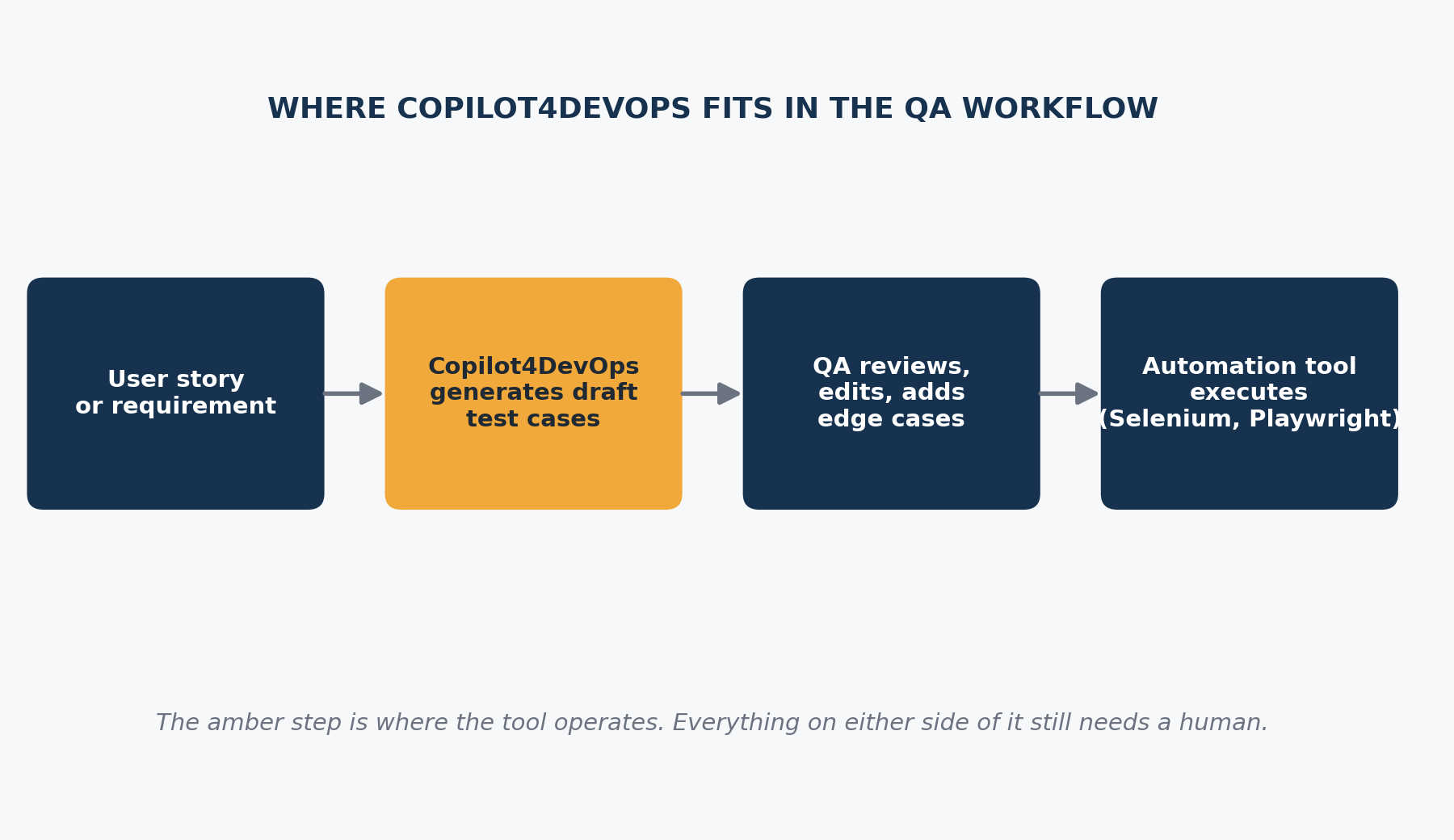
Copilot4DevOps Turns a User Story Into Test Cases in Under a Minute
Copilot4DevOps reads a user story, requirement document, or an uploaded screenshot and generates positive, negative, and edge case test scenarios mapped back to that work item, without leaving Azure DevOps. A login feature story that takes a tester 20 to 30 minutes to draft by hand comes back with a structured first pass in under a minute, in my own runs against real sprint backlogs.
The draft still assumes the story itself is well written, so a vague or incomplete user story produces vague test cases. Garbage in still means garbage out here. Review every generated case before it becomes a sprint commitment, not after. Teams miss the real comparison because they benchmark the tool against writing from scratch instead of against the 15 to 20 minutes they’d otherwise spend hunting for a template.
Traceability Survives the Handoff, Which Copy and Paste Never Did
When test cases live inside the same Azure DevOps item as the user story, a change to that story flags the linked test cases instead of leaving them silently stale. I’ve watched a team lose a full sprint of test coverage because a requirement changed and nobody updated the dozen test cases sitting in a spreadsheet three tools away. Copilot4DevOps keeps that link live through its impact assessment feature, which flags affected test cases when a linked work item changes.
This only holds if the team is disciplined about linking work items in the first place. The tool can’t create traceability out of a backlog that never had any.
Automation Scripts Come Out Selenium and Playwright Ready, Not Production Ready
Copilot4DevOps generates automation-ready scripts in Selenium, Playwright, JUnit, and NUnit straight from the test cases it drafts, cutting the gap between a written test case and a runnable one. A script generated from a login test case still needs a QA engineer to wire in real selectors, test data, and environment configuration before it runs clean in a pipeline.
Teams expecting a one click path from user story to a passing CI run will be disappointed. This is scaffolding, not a finished automation suite. Vendor demos show the happy path script running clean. They don’t show the maintenance burden of the next twenty scripts.

It’s Built for Regulated Teams, Which Is Both a Strength and a Ceiling
Copilot4DevOps markets itself toward compliance-heavy environments: healthcare, finance, and government contracting, where every test case has to trace back to a requirement for an audit. That focus makes the tool stronger at documentation and SOP generation than at creative test design, because compliance rewards consistency over the break-it-on-purpose thinking exploratory testing calls for.
A team running a fast-moving consumer product with lighter compliance needs will find half the feature set sitting unused: the SOP generator, the diagramming tool. Match the tool to the team, not the other way around.
Pricing Punishes Small Teams More Than It Rewards Big Ones
Copilot4DevOps’ own pricing page lists the Ultimate tier at $35 a user a month billed annually, or $40 billed monthly. A five-person QA team is looking at more than $2,000 a year before any Bring Your Own LLM or Bring Your Own Data add-on, both of which require a sales conversation instead of a listed price.
GitHub Copilot is publicly listed at roughly $10 a user a month and does far less for structured test case generation, so the calculus for a small team gets uncomfortable fast. The free 15-day trial with a 15 million token allowance per user is generous enough to run a real pilot against an actual backlog before committing. Use it. Buying on the strength of a demo alone is how a tool ends up unopened by week three.
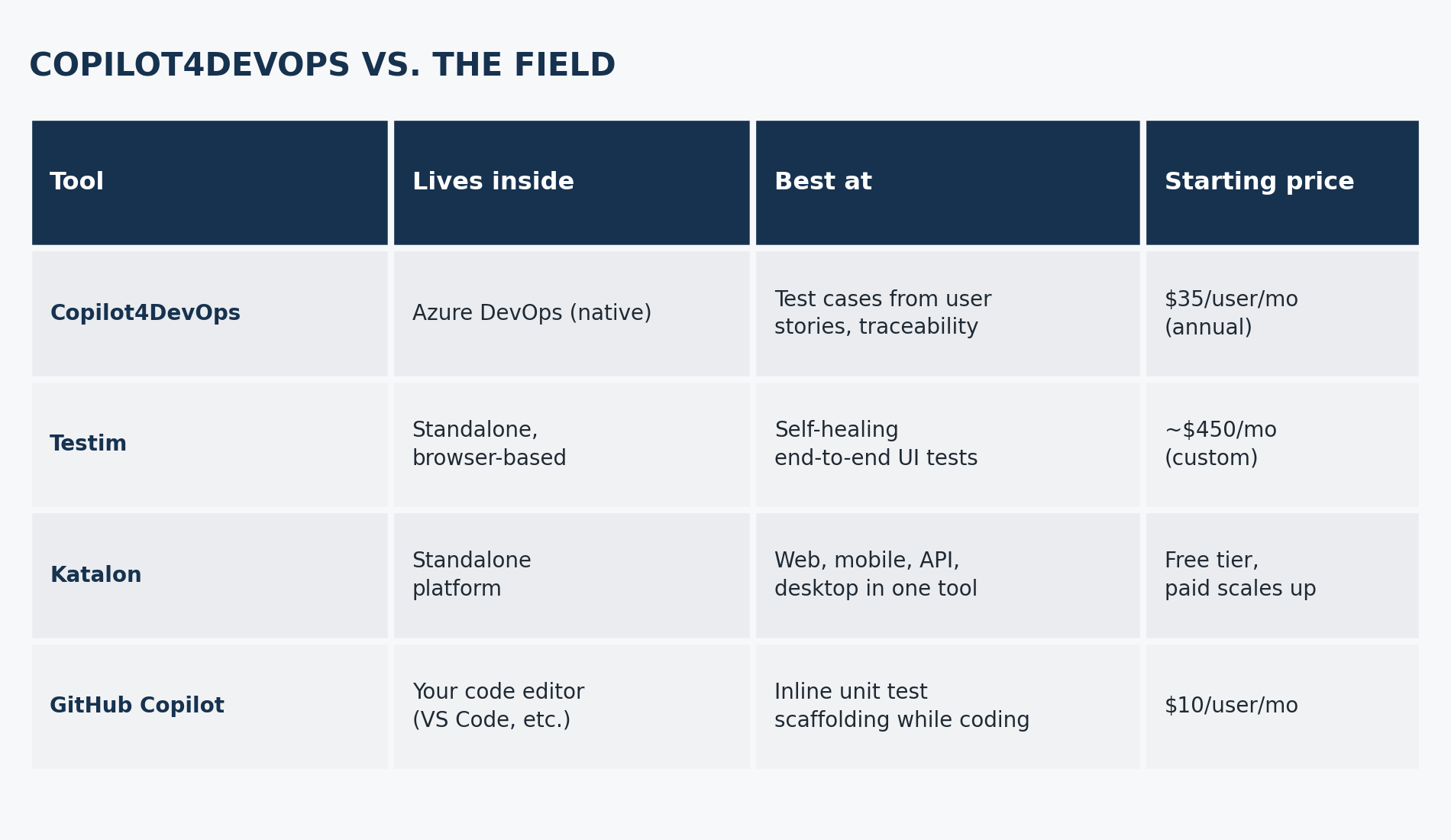 Pricing shown is starting price per user per month, publicly listed as of this writing.
It Solves a Different Problem Than GitHub Copilot
GitHub Copilot lives in a code editor and suggests code and unit tests as a developer types, which puts it later in the lifecycle and closer to implementation. Copilot4DevOps lives in the work item and operates on requirements, which puts it earlier, before a line of code exists.
A team asking which one to buy is usually asking the wrong question, because a mature pipeline has room for both: one drafting test cases from requirements, the other drafting unit tests from code. The friction shows up when a team buys one expecting it to cover the other’s job.
The Stuff That Doesn’t Work
Three things conventional wisdom says matter here don’t hold up under review.
“Boosts test coverage” as a headline claim falls apart on inspection. More generated test cases is not the same as better test coverage. I’ve seen a generated suite hit 90 percent of the happy paths while missing the one negative case that actually broke in production. Run a human gut check against real usage patterns, not just a count of cases produced.
The vendor’s own case studies, a claimed 60 percent cut in backlog refinement cycles and a claimed 90 percent cut in manual testing effort, are self-reported, not independently audited. I treat any vendor-reported percentage the way I treat a résumé: worth reading, not worth taking at face value. Ask for a reference customer in your industry before building a business case around someone else’s number.
I used to assume “AI generated” and “requires less review” were the same claim. They’re not, and that assumption cost my team real rework early on. A generated test case needs the same review a junior tester’s draft would get. The AI replaces the first pass, not the senior reviewer’s judgment.
How This Changes What You Do

Four moves, in order, if you’re evaluating this for a real QA team, not a demo.
- Run the 15-day trial against your messiest real backlog, not a clean demo project, before signing anything.
- Set a hard review gate so no AI-generated test case reaches a sprint without a second set of eyes.
- Measure the tool by hours saved on drafting, not by a vague coverage percentage handed to you in a sales deck.
- Keep a real automation framework- Selenium, Playwright, whatever the team already runs, for execution, since Copilot4DevOps drafts scripts and doesn’t own the pipeline. For more on how AI drafting tools are reshaping test design, see TestMetry’s AI in QA coverage.
FAQ
What is Copilot4DevOps used for?
Copilot4DevOps is an AI assistant built directly inside Azure DevOps that generates requirements, test cases, and documentation for software testing work from existing work items. It exists to cut the manual writing time QA teams and business analysts spend on these artifacts by hand. In practice, a QA lead uses it to turn a user story into a first draft set of test cases in under a minute, then reviews and refines from there.
Is Copilot4DevOps free?
No, Copilot4DevOps does not offer a permanent free tier. Paid plans start around $35 a user a month for the Ultimate tier when billed annually, with a free 15 day trial available first. Run that trial against a real backlog before buying, since it includes the full feature set and a 15 million token allowance per user.
How does Copilot4DevOps generate test cases?
Copilot4DevOps generates test cases by reading a linked user story, requirement document, or uploaded screenshot, then producing positive, negative, and edge case scenarios mapped back to that work item. This differs from a generic chatbot because the output stays connected to the original requirement instead of living in a separate window you copy from. Review each generated case for the domain-specific edge cases the model won’t know.
Does Copilot4DevOps work outside Azure DevOps?
No, Copilot4DevOps is built natively inside Azure DevOps and doesn’t operate as a standalone tool anywhere else. This is a deliberate design choice, not a limitation the vendor is trying to fix, since the whole value rests on staying inside the requirements structure Azure DevOps already has. Teams on Jira, GitLab, or another ALM tool need a different assistant built for that platform.
How is Copilot4DevOps different from GitHub Copilot?
Copilot4DevOps and GitHub Copilot solve different problems at different points in the lifecycle. GitHub Copilot works inside a code editor to suggest code and unit tests as a developer writes, while Copilot4DevOps works inside Azure DevOps work items to generate test cases from requirements before any code exists. A mature QA pipeline can reasonably run both instead of choosing one over the other.
Can Copilot4DevOps generate automated test scripts?
Yes, Copilot4DevOps can generate automation-ready scripts in Selenium, Playwright, JUnit, and NUnit based on the test cases it drafts. Those scripts are scaffolding, not finished automation, so a QA engineer still has to wire in selectors, test data, and environment configuration before they run clean in a pipeline. Budget review time for every generated script the way you would for a junior engineer’s first draft.
Can you use Copilot in Azure DevOps?
Yes, but it depends on your repos. GitHub Copilot’s full agent features, turning a work item into a pull request, only work with GitHub repositories linked through Azure Boards. Azure Repos aren’t supported for that yet, though Copilot still helps there with code completions and PR descriptions in Visual Studio. For requirements and test case generation, that’s a separate job, and it’s what Copilot4DevOps handles instead.
What is Modern Requirements4DevOps?
Modern Requirements4DevOps (MR4DevOps) is a requirements management tool built natively inside Azure DevOps. Requirements live as actual Azure DevOps work items, not a separate document, which matters most for regulated industries needing clean audit trails. Copilot4DevOps is the AI layer on top of it, the part that drafts requirements and test cases instead of a person typing each one.
What can I learn in Copilot4DevOps?
You’ll learn a specific set of AI-assisted moves, not general AI skills. That includes Elicit for pulling structured requirements from messy notes, Analyze for checking requirement quality, and Generate for turning a user story into test cases and automation-ready scripts (Selenium, Playwright, JUnit, NUnit). The 15-day free trial is the fastest way to learn these against your own backlog instead of a demo.
The Bigger Picture
The AI-enabled testing market is projected to grow from $1.01 billion in 2025 to $4.64 billion by 2034, an 18.3 percent compound annual growth rate, according to Fortune Business Insights. That trajectory means Copilot4DevOps isn’t a one-off bet. It’s an early entry in a category about to get crowded, and Testim, Katalon, and newer entrants like TestSprite are all racing toward the same requirements to close the test gap from different starting points.
Tools built natively inside one platform, Azure DevOps for Copilot4DevOps, have an edge on traceability that standalone platforms have to work harder to match. Tools built standalone have an edge with teams that live across multiple platforms and don’t want to be locked into one place. Neither approach wins outright. The QA leads who get the most from this next wave will be the ones who picked a tool for their actual workflow, not for the demo that looked cleanest in a sales call.
Closing
Copilot4DevOps is worth the trial if your team already lives inside Azure DevOps and the bottleneck is drafting, not judgment. If that’s not the actual bottleneck, the $35 a month is better spent training a tester to write faster templates by hand. I built parts of NoSkript around the same instinct: AI should draft, and a human should still decide.